Contents
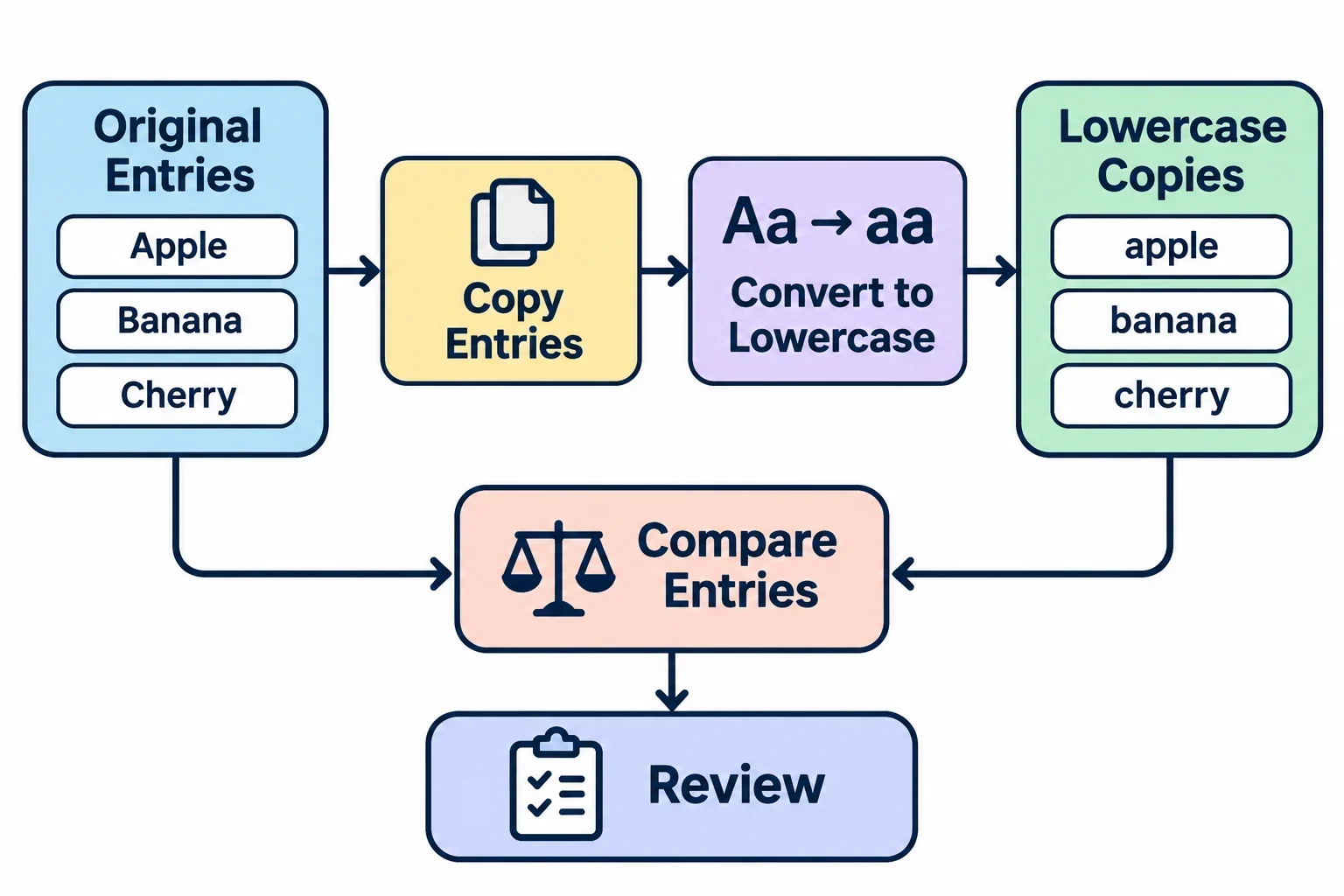
To compare entries without treating uppercase and lowercase letters as different, make a lowercase copy of each entry and compare those copies. Keep the original text alongside each result so you can check what a possible match represents before changing anything.
For example, “Blue Wig” and “blue wig” both become “blue wig” in lowercase. That makes them possible duplicates, but it does not settle whether the full records are duplicates. Spaces, punctuation, spelling, and your choice of fields can also affect the result. The workflow below helps you make those decisions deliberately.
Choose what counts as a duplicate
Start by deciding what you are trying to find. Two rows with the same product name might be duplicate entries in a simple list, but they might represent different items if another field distinguishes them. Write down the fields that must match before you begin, and check that those fields are available for every entry you want to review.
Suppose your list contains an item name and a color field. If your goal is to find repeated names, compare the names. If a duplicate must have both the same name and the same color, compare both fields. A name match on its own is then a reason to inspect the records, not a reason to remove one. Use the same rule throughout your comparison so that similar cases receive similar treatment.
Next, ask whether capitalization carries meaning in your entries. If it does, lowercasing can still help you find candidates, but you will need to check the original capitalization before deciding whether they match. For instance, a short code written in different cases might need closer review under your own naming rules.
Decide how you will handle incomplete entries too. If one row has a name but no color, you may not have enough information to compare it under a name-and-color rule. Set it aside for review instead of assuming that the missing value matches another row. These decisions make the later comparison easier to interpret.
Make lowercase comparison copies
Keep the source entries intact and create a separate working copy for comparison. In a spreadsheet, that might mean retaining the original text in one column and placing the lowercase result in another. For a short list, you can also use a separate working document, provided each copy remains clearly connected to its source.
For each entry, use this sequence:
- Copy the text from the field you have chosen to compare.
- Enter the copy in a case converter and select lowercase.
- Review the output, then copy it into your comparison area beside the original entry.
- Repeat for the remaining entries, keeping each result on the correct row or under a clear identifier.
The input is the text you want to compare; the output is a lowercase version used for checking. For example, “Blue Wig” becomes “blue wig,” and “blue wig” remains “blue wig.” The original entries stay as they were, while the comparison copies now match in capitalization.
If you are comparing several fields, make a separate lowercase copy for each relevant text field. Keeping them separate makes it easier to see whether a name matches while a color or another field differs. It also helps you avoid accidentally treating part of one field as part of another.
After copying the results, scan a few against their originals for missing words, misplaced rows, or accidental edits. If an output does not appear to represent its source, correct the working copy before proceeding. The comparison will only be useful if you can trust which original each result belongs to.
Compare the results
For a small number of entries, place the lowercase copies side by side and read them carefully. Look for copies that match under the rule you chose. Mark those pairs or groups as possible duplicates, then return to the originals to see whether the records also agree in any other required fields.
For a longer list, a spreadsheet can provide a more manageable working area. Keep one row per original entry, with the original text and its lowercase comparison copy in separate columns. Add a review column where you can record a note such as “check with row 8.” If you sort or otherwise rearrange the working list, make sure the information belonging to each entry stays together.
A simple working layout might look like this:
| Entry | Original name | Lowercase copy | Review note |
|---|---|---|---|
| A | Blue Wig | blue wig | Check against B |
| B | blue wig | blue wig | Check against A |
| C | Blue Wig | blue wig | Check color before deciding |
The three lowercase names match, so all three deserve a look. If color is also part of your duplicate rule, compare that field before grouping them as duplicates. A matching name alone does not establish that the complete records are the same.
Work through each group and record enough information to find it again. If your list has its own stable identifiers, use them in your notes; otherwise, make clear labels in the working copy. This keeps a possible match traceable when you move on to the final review.
Investigate entries that still differ
Lowercasing addresses capitalization, but it does not make every similar-looking entry identical. If two copies appear to describe the same thing yet do not match exactly, inspect the differences before changing either copy. Start with the beginning, middle, and end of each entry.
- Spaces: Look for a space before or after the text, or repeated spaces between words. Leading, trailing, and repeated spaces can also affect sorting, filtering, or searching.
- Nonprinting characters: A character you cannot readily see may affect those operations too. If an apparent match remains unexplained, inspect the text with a method available in your working environment or re-enter a comparison copy carefully, then check it against the original.
- Punctuation: Compare marks such as hyphens and periods. Decide whether a difference is meaningful for your list before removing or changing it in a working copy.
- Spelling: Read the words letter by letter. A spelling difference may be an error, or it may identify a different entry; use the surrounding record to help decide.
For example, “blue wig” and “blue wig” have different spacing between the words. You might choose to treat them as the same name for your review, but first decide whether repeated spaces have any intended meaning in your data. Record the rule you apply so you can use it consistently on other entries.
If you make an additional cleaned copy, retain both the original and the lowercase version. That gives you a way to see what changed at each step and revisit a match if your cleaning rule turns out to be too broad.
Review possible duplicates before removal
A match in a comparison column is a prompt to review, not an instruction to delete. Open or inspect the original entries together and check every field required by your duplicate rule. Look for details that explain why similar names might belong to separate records, as well as missing information that prevents a confident decision.
For each group, decide whether to retain the entries separately, merge information, or remove an entry. The right choice depends on what the records represent and what information each contains. If two entries appear identical in the fields you checked but one has additional information elsewhere, examine that information before choosing what to keep. If you cannot tell whether they refer to the same thing, leave them flagged for a later check.
Keep an unchanged copy of the original data available before making removals or merges. In your working list, note the decision and the entries involved so you can understand the result later. If you merge information, check the resulting record against both originals for anything you intended to retain.
Before finishing, review the entries you set aside because a required field was missing or a difference was unclear. Ask: which fields actually match, does the capitalization carry meaning, and have spaces or punctuation been handled according to your chosen rule? Those questions turn a lowercase comparison into a careful review, while preserving the context needed to make the final decision.